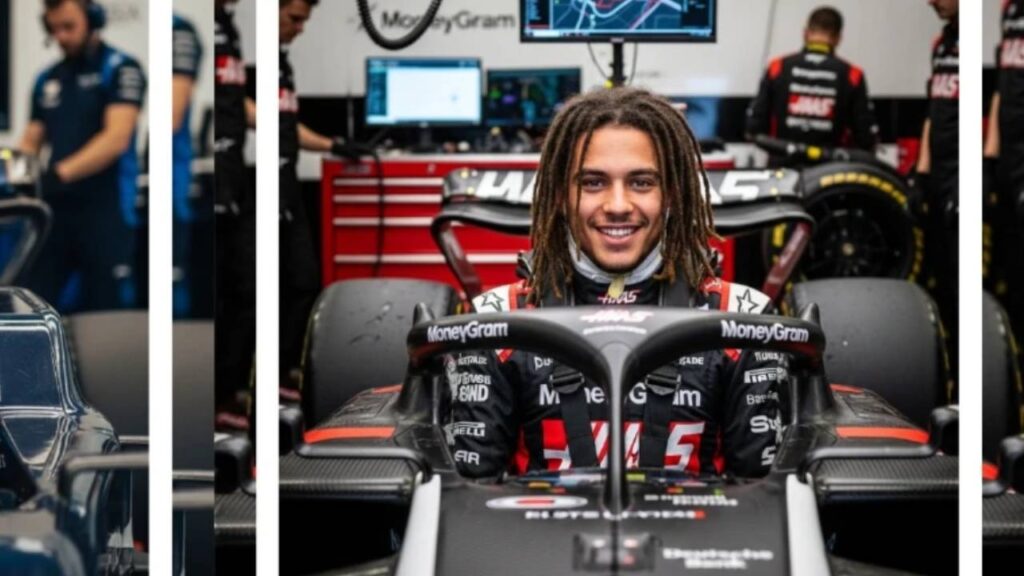
Want to make Formula 1 driver edits that look like real press photos? With NextGen Image 3.0, a next-level AI image generator, you can create hyper-realistic F1 team portraits, lifelike race suits, and authentic pit-lane backgrounds in seconds. Whether you’re a motorsport fan, digital creator, or social media enthusiast, these 10 prompts will help you craft stunning visuals worthy of the F1 grid.
NextGen Image 3.0: Revolutionizing F1 AI Portraits
NextGen Image 3.0 combines world-knowledge reasoning with photorealistic rendering, making it ideal for Formula 1 AI photo edits. It recognizes details like sponsor logos, lighting environments, and facial consistency, ensuring each image feels authentic and human-captured. The result? Edits so realistic, they could pass for official team portraits or media shots.
How to Create F1 Driver Edits with NextGen Image 3.0
- Go to the NextGen Image 3.0 dashboard and log in to unlock premium tools.
- Upload a clear photo (front-facing, high quality in JPG or PNG).
- Enter a detailed prompt describing:
- Driver details (name, team, suit colors, helmet type)
- Environment (pit lane, podium, night race)
- Lighting style (“studio lighting,” “track sunlight,” etc.)
- Accessories (gloves, patches, sponsors)
- Set the resolution to 4K or 8K for sharp output.
- Choose aspect ratio (portrait or landscape) for best framing.
- Click Generate and let NextGen’s AI refine your prompt for perfect realism.
- Preview, tweak lighting or suit textures if needed, and download your final masterpiece.
Pro Tips for Perfect AI F1 Edits
- Use multi-part prompts including driver name, race event, emotion, and team style.
- Add realism with sports photography cues like “motion blur,” “crowd background,” or “victory pose.”
- Keep “original face intact” for consistency and recognizability.
- Describe full team shots for group edits — “Red Bull pit celebration,” “Ferrari podium spray,” etc.
- Upload high-resolution photos to maximize detail retention and skin realism.
🧩 Quick Specs
Tool Name: NextGen Image 3.0
Best Use: Ultra-realistic F1 driver and team edits
Resolution: Up to 8K UHD
Supported Formats: JPG, PNG
Ideal For: Content creators, motorsport fans, designers, social media posts
10 NextGen Image 3.0 Prompts for Ultra-Realistic F1 Edits
Prompt 1: “A female driver with long brown hair in a green Aston Martin racing suit, seated in the team’s F1 car cockpit, surrounded by teal-clad pit crew. Maintain original face.”
Prompt 2: “A young man with dreadlocks wearing a black-red Haas racing suit, sitting in the cockpit with crew members visible in the pit lane. Keep same face.”
Prompt 3: “A woman in a red Ferrari suit, smiling excitedly from the driver’s seat, with pit crew and monitors behind her. Don’t change the face.”
Prompt 4: “A male driver with glasses in a black Mercedes-AMG suit, focused expression, surrounded by crew in black uniforms. Keep face unchanged.”
Prompt 5: “A female driver with curly dark hair and sunglasses in an orange McLaren suit, in a pit-garage setting with mechanics behind. Maintain same facial identity.”
Prompt 6: “A young man in a dark blue Red Bull suit, looking forward with confidence inside his cockpit, pit lane visible. Preserve original face.”
Prompt 7: “A woman in a pink and blue Alpine F1 suit, calm expression, seated in her car with crew working nearby. Keep same face.”
Prompt 8: “A man with curly hair and mustache in a white suit with ‘Hugo’ branding, sitting in a Red Bull-affiliated car, surrounded by dark blue crew. Face unchanged.”
Prompt 9: “A smiling woman in a dark blue Williams suit, in a garage environment with pit members around. Keep identical face.”
Prompt 10: “Analyze the subject’s photo and match it with the most fitting F1 team based on their personality — confidence (Red Bull), precision (Mercedes), passion (Ferrari). Generate a natural, iPhone-style garage photo showing them inside the cockpit, no stylization, true-to-life lighting and textures, and an authentic candid look.”
Final Thoughts
With NextGen Image 3.0, you can create F1 visuals that blur the line between digital art and photography. Each prompt helps you explore realism, storytelling, and brand-inspired design in one click. From Ferrari’s fiery red to Mercedes’ sleek silver, your AI-generated images will feel like they came straight from race day.
Hi, I’m Ali Raza , the creator of Isoar. I started this platform out of my passion for technology and my curiosity to explore how it shapes our everyday lives. I love researching new tools, writing about emerging tech trends, and sharing practical tips that help people stay ahead in the digital age. Through Isoar, I aim to make technology accessible, useful, and exciting for everyone.